iOS DeviceCheck / App Attest Deep Dive
App Attest establishes trust in an iOS app instance through an Apple-managed key in the Secure Enclave. This page follows the process from key creation through attestation and subsequent assertions, then describes the checks performed by the service. Client-library configuration is covered elsewhere.
Setup
The setup assumes:
- Active Apple Developer Program membership
- An iOS device (not Simulator) as target, running iOS 14+
- Xcode 15+ recommended
Step 1: Prepare App ID and Signing
- Ensure your app’s Bundle ID is registered in your Apple Developer account.
- Build and run on a physical device using a valid signing certificate and provisioning profile.
Step 2: Add Required Capabilities in Xcode
- Open your project > target > Signing & Capabilities.
- Add Associated Domains (recommended):
- If you’ll bind to your domain, add
webcredentials:your.domain(and/orapplinks:your.domainfor related flows).
- If you’ll bind to your domain, add
- App Attest entitlement:
- Click on "+ Capability"
- Select "App Attest"
- An app can be built for two environments: production for App Store distribution and debug/development/sandbox for testing/development purposes.
- Your server must verify this!
- Warden Supreme exposes this via the iOS-specific
sandboxconfiguration parameter
Once configured, the app can use App Attest.
High-Level Flow
Apple distinguishes attestation from assertion. Attestation initially establishes the app instance; assertions subsequently demonstrate continuity before selected operations.
-
Attestation
- App calls
generateKey()to create a Secure Enclave key for App Attest. - App obtains a one-time server challenge and then calls
attestKey(keyId, clientDataHash). - Apple returns an attestation object proving that the key belongs to a legitimate instance of your app, and a certificate chain rooted in Apple’s App Attest CA.
- App sends
{attestationObject, keyId, challenge}to your back-end.
- App calls
-
Ongoing use (Assertion)
- For each privileged request, your server issues a fresh challenge.
- App calls
generateAssertion(keyId, clientDataHash)to get an assertion:{authenticatorData, signature, keyId, (counter)}. - Server verifies the assertion using the stored public key (from registration) and ensures the counter increases, proving continuity.
Figure 1 shows the entities involved in both flows.
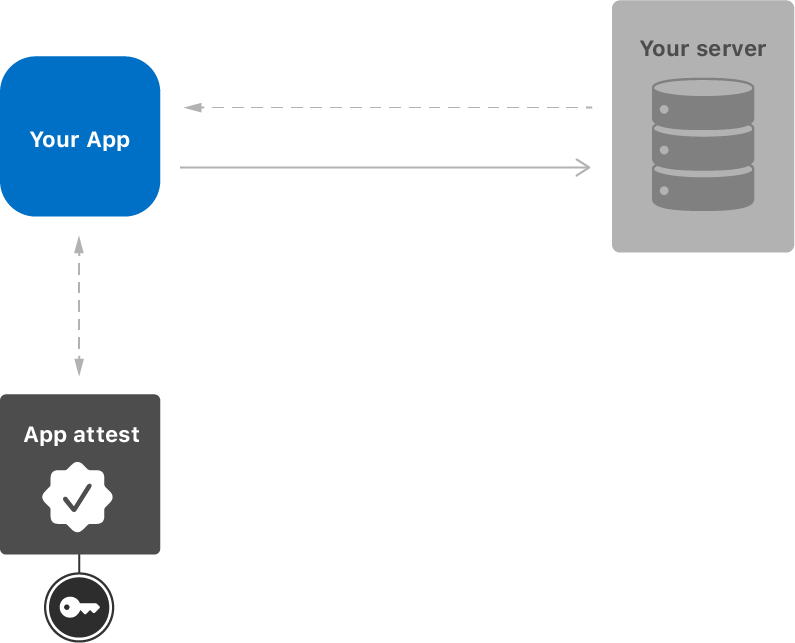
Warden Supreme relies on attestation, but also generates a separate public/private key pair inside the Secure Enclave and
feeds the public key’s hash into clientDataHash to bind that usable key to the Apple-signed attestation.
Since App Attest does not provide native key attestation for arbitrary keys, this binding is used to emulate key attestation
(see Emulating Key Attestation).
If you are deciding between direct App Attest tooling and Warden Supreme, see Why Warden Supreme?.
The fully integrated Warden Supreme flow uses attestation and emulated key attestation to provide the same model on Android and iOS. It does not natively support assertions for the reasons explained below.
Server-Side Validation
Parse & Verify the Certificate Chain
- Extract
attStmt.x5cand build a chain to Apple’s App Attest intermediate and root; verify signatures, Basic Constraints, key usages, and time validity. - Pin trust to Apple’s App Attest roots; do not rely on a general-purpose system trust store.
Recompute and Verify the Nonce
Apple defines the nonce as the SHA‑256 hash of authenticatorData || SHA256(challengeBytes) (concatenation of raw
bytes). It is calculated as follows:
- Compute
clientDataHash = SHA256(challengeBytes)using exactly the challenge your server issued. - Concatenate
authenticatorData || clientDataHash, then computenonce = SHA256(...). - Compare
nonceto the value in the leaf attestation certificate extension as specified by Apple’s guide.
Validate authenticatorData Semantics
Limitations
Unlike Android, iOS does not allow binding arbitrary app keys to system-enforced user authentication with configurable timeouts, nor can such user-auth requirements be attested for those keys.
Within authenticatorData, validate at least:
- RP ID hash: Must equal
SHA‑256( TeamID + "." + BundleID ). Reject if mismatched. - Flags: Ensure expected bits are set (user present/verified semantics are Apple-defined for App Attest; you primarily rely on counter and RP ID hash).
- Sign count / counter: On attestation, Apple requires counter = 0.
- AAGUID / environment: Confirms Production vs Sandbox; reject environment mismatches.
Emulating Key Attestation
App Attest natively attests the app instance (App ID) and the Apple‑managed key. To emulate key attestation for your application key material:
- Your client builds
clientDataBytesthat includes your public key bytes (to be used for subsequent protocol steps) and the server challenge. - Compute
clientDataHash = SHA256(clientDataBytes)and pass it intoattestKey/generateAssertion. - On the server, after validating the Apple artefacts, extract and validate the public key bytes embedded in your client data.
- This binds Apple’s attestation to your application key, yielding verifiable linkage similar to Android key attestation.
Warden Supreme implements this process and delegates the platform-specific verification to Vincent Haupert's DeviceCheck / AppAttest library. No custom binding logic is required on the client or back-end.
Assertions and Usage Model
After recording an initial attestation, a service can use assertions to check continuity of the app instance.
Assertion Contents
An assertion from generateAssertion(keyId, clientDataHash) yields:
- authenticatorData: Includes the RP ID hash and a monotonically increasing sign counter.
- signature: Over authenticatorData || clientDataHash using the registered App Attest key. Hence, the key used for the original attestation must be recorded.
- keyId: Identifies the App Attest key pair on device.
The server verifies the signature with the stored public key (from the attestation/registration step) and validates that
the RP ID hash matches the expected SHA256(TeamID + "." + BundleID).
The Sign Counter
An assertion contains a counter value.
- The counter starts at 0 at attestation time.
- Each successful generateAssertion should increase it by at least +1.
- The server needs to persist the highest seen counter per keyId. On each request:
- Reject if the new counter <= last seen (replay or rollback).
- Accept if strictly higher, then update stored value.
- Counter continuity provides tamper-resistance (e.g., against state rollback from device backups).
Periodic Re-Attestation via Assertions
Complexity Ahead!
Performing re-attestation through assertions requires tracking device states over the whole lifetime of the service used by the app.
- Apple intended assertions to guard privileged actions with a fresh, server-bound challenge.
- You can treat recurring assertions as “lightweight re-attestation”:
- Issue a challenge at session start, high-risk operations, or on a cadence (e.g., hourly).
- Require a valid assertion and counter increment to proceed.
- This confirms the same App Attest key is active, on the same app instance, and not rolled back.
Apple’s Intended Usage of App Attest
Warning
Even "lightweight re-attestation" requires devices to interact with Apple services, allowing for user tracking.
- Protect critical sections and privileged API calls with per-request challenges and assertions.
- Use full attestation (registration) once per app instance, then rely on assertions to maintain trust over time.
- Assertions are expected to be online: the device contacts Apple during assertion generation, so budget for this latency in UX and retries.
Assertion Wrap-Up
Using assertions as “re-attestation” has two notable downsides: - Back-end state management burden - You must persist per-device key state (keyId, highest seen counter, environment), enforce strict counter monotonicity, handle resets/rollbacks (e.g., device restores), and design recovery paths (counter desync, key rotation, multi-device users). This adds storage, concurrency control, migration, and incident-handling complexity. Risk-based policies (cadence, per-action challenges) further increase statefulness and operational overhead.
- Privacy and tracking concerns
- Assertions require contacting Apple services. This creates additional metadata exposure to Apple (time, frequency, success/failure of assertions) and can enable cross-session correlation via stable keyIds if you don’t carefully scope/rotate them. On your side, the very act of frequent assertions encourages building long-lived device-level identifiers and histories, which can increase linkability of user behaviour. Minimising assertion cadence, scoping identifiers, and separating environments reduces—but does not eliminate—these privacy risks.
Warden Supreme therefore relies on fresh attestations with emulated key attestation rather than assertions in its integrated flow. This model is independent of individual user actions and matches the Android ceremony more closely.
Receipts and Risk Assessment
A receipt is part of the attestation structure sent from an iOS device to the back-end. It contains the bundle identifier, attestation certificate, validity period, and other information used by Apple.
After successful attestation, the back-end can retain this receipt and later send it to Apple for an additional risk assessment. Apple returns a new receipt containing a risk metric. According to Apple, it indicates the number of attested keys associated with a given device over the past 30 days and one should look for this value to be a low number (for whatever that means).
The more important concern is privacy. Apple already observes App Attest requests; receipt exchange additionally creates direct communication between the back-end and Apple after the service registers for an authentication token.
Note
For critical services and a real risk of a single rogue device being used to create hundreds or thousands of attestations by proxy, it can be viable to utilise Apple's service to assess fraud risk. Use at your own discretion.
Apple thus provides a behaviour-dependent risk metric without clear interpretation guidance and at an additional privacy
cost. Warden Supreme considers the exchange out of scope, but exposes the receipt through ValidatedAttestation after
successful verification. A service can extract, store, and submit it independently if its threat model justifies this.
Operational Guidance
- Online dependency: App Attest requires a live connection to Apple for attestation and assertions. Implement retries/queuing and clear UX. See Preparing to Use App Attest.
- Rate limiting: Avoid unnecessary re‑attestation; cache successful registrations and only assert per privileged request or session cadence that suits your risk posture.
- Stage separation: Keep Sandbox and Production completely separate — App ID, keys, and trust anchors don’t mix across stages.
- Privacy: Apple observes attestation/assertion events.
Verification Pitfalls to Avoid
Warden Supreme handles these checks in its integrated flow. Custom implementations must account for them explicitly.
- Wrong nonce computation: Use
nonce = SHA256( authenticatorData || SHA256(challengeBytes) ). Do not swap order or hash the whole CBOR. - Ignoring environment: Production vs Sandbox must match your deployment stage.
- Trusting system roots: Pin to Apple’s App Attest roots; don’t accept arbitrary Apple CAs.
- Skipping counter checks: The monotonic counter is your continuity signal; enforce strictly increasing values.
- Leaking key material: Never transmit or store private keys. Persist only the public key and minimal metadata.
- Time Drift: Out-of-sync clocks between clients and server can cause the PKIX validation part to fail. See also Clock Drifts and Temporal Validity.
References and Libraries
See the consolidated References: